Think about the last time a doctor in your clinic spent 20 minutes updating a chart instead of seeing a patient. Or when your front desk called an insurance company for the fourth time that week just to confirm coverage. That is not a staffing problem. That is an EMR integration problem.
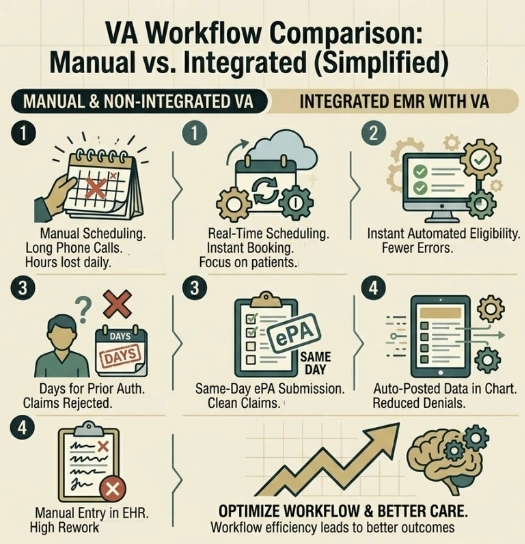
When your virtual assistants for healthcare work in isolation, they help a little. When they are fully connected to your EMR through proper EMR integration, everything changes. Scheduling runs itself. Eligibility checks happen automatically. Prior authorizations move faster. And your clinical team gets their time back.
This guide focuses on how to connect virtual assistants to Athena Health, which workflows to automate first, what the return looks like, and how to do all of it without putting patient data at risk.
The AMA reports that physicians spend nearly 2 hours on administrative tasks for every 1 hour of direct patient care. Source: American Medical Association
- Why Your Virtual Assistants Are Only Half as Useful Without EMR Integration
- The Workflows Worth Automating First in AthenaHealth Integration
- Two Ways Medical Virtual Assistants Connect to AthenaHealth
- Keeping Patient Data Safe: Security and HIPAA Compliance
- How to Roll This Out Without Breaking Your Clinic
- What Texas Clinics Are Actually Seeing After Integration
- FAQs
- How Integrate Point Helps You Build This in Texas
Why Your Virtual Assistants Are Only Half as Useful Without EMR Integration
A virtual assistant working outside your EMR is like having a staff member who cannot access the patient’s chart. They can do some things. But the real work, the scheduling, the eligibility checks, the documentation, all of it still requires someone to bridge the gap manually.
That gap is where time disappears. Healthcare workflow automation only delivers its full value when the assistant is embedded directly inside the system your team already uses. For thousands of US clinics, that system is AthenaHealth.
AthenaHealth provides API and FHIR endpoints that make deep integration both practical and secure. According to HealthIT.gov, FHIR based integrations are now the recommended standard for health data exchange across US healthcare systems. This means your virtual assistants can read from and write to the chart, just like a staff member would, but faster and without overhead.
The Workflows Worth Automating First in AthenaHealth Integration
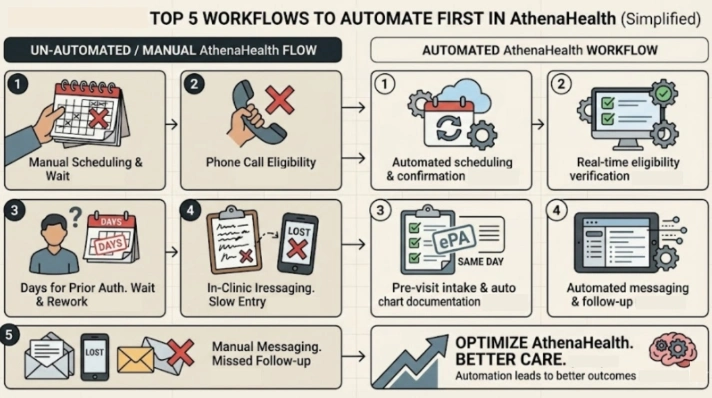
Not every workflow needs to be automated on day one. The smartest approach is to start with the tasks that eat the most time and carry the highest risk of error. Here is where most Texas clinics and hospital departments see the fastest return.
Appointment Scheduling and Confirmations
This is the lowest friction starting point for healthcare scheduling automation. The virtual assistant checks Athenahealth’s real time availability, book or reschedule appointments, and sends confirmation messages to patients automatically. Your front desk stops being a call center and starts being a care coordination team.
Insurance Eligibility Verification Automation
Insurance eligibility verification automation through AthenaHealth API pulls a patient’s active coverage details before every appointment. The assistant flags any gaps, confirms copays and deductibles, and displays the information to staff before the patient checks in. No more last minute surprises. No more avoidable claim denials.
According to CMS, eligibility errors are among the leading causes of preventable claim denials across US healthcare practices. Automating this step removes the risk entirely.
Electronic Prior Authorization
ePA integration with AthenaHealth through partners like CoverMyMeds means prior authorization requests are submitted, tracked, and updated in the chart automatically. Your team stops chasing approvals and starts trusting the system to move things forward. According to HHS.gov, electronic prior authorization reduces processing time significantly compared to manual submissions.
Pre Visit Intake and Chart Documentation
Before the patient arrives, the assistant collects medication lists, symptom histories, and basic vitals through a secure chat. That information is posted directly into the AthenaHealth chart as structured FHIR data. Automated chart documentation means the doctor walks in already knowing what they need to know.
Post Visit Messaging and Follow Up
Patient messaging automation handles the follow up work that always falls through the cracks. Discharge instructions, refill reminders, referral status updates, and appointment confirmations all route back into AthenaHealth’s messaging system automatically. Patients stay informed. Staff stay free.
Two Ways Medical Virtual Assistants Connect to AthenaHealth
There are two main integration paths. The right one depends on your clinic’s complexity, your IT setup, and how quickly you want to move. Both are effective when implemented correctly.
Path 1: Direct API Integration
This is the most efficient option for medical virtual assistants working on scale. The VA platform connects directly to AthenaHealth through secure API credentials. Data flows automatically between the two systems without anyone needing to click through screens manually.
The assistant pulls patient schedules before appointments, captures documentation during or after the visit, and pushes finalized notes into the correct chart fields. CPT and ICD-10 codes go directly into coded fields, which reduces manual entry errors and speeds up claim submission.
According to HealthIT.gov, practices that use API based integrations report significantly faster data exchange and fewer transcription errors compared to manual documentation workflows.
Path 2: Virtual Desktop Integration
Remote medical scribes using secure virtual desktop access to work inside AthenaHealth just like an in-office scribe would, except they are working remotely through encrypted access. They listen to the visit and document the encounter directly in the live system.
This approach works best for complex specialties, non-standard documentation styles, or clinics that want human judgment in the loop. It avoids the time and cost of full API builds while still delivering real efficiency gains for your team.
Keeping Patient Data Safe: Security and HIPAA Compliance
Any clinic considering AthenaHealth integration with a virtual assistant needs to treat security as a priority, not an afterthought. Protected health information is involved in every step of this process. Getting it wrong has legal consequences and destroys patient trust.
The first requirement is a signed Business Associate Agreement with the VA vendor. According to HHS.gov HIPAA guidelines, any third party that handles protected health information must legally commit to protecting it under HIPAA rules. No BAA means no integration.
Beyond the BAA, access controls matter. The system should only give each user or assistant access to exactly what they need for their specific task. Nothing more. Strong authentication, encrypted connections, and activity logging should all be in place before a single patient record is touched.
Physician oversight is non-negotiable. Every note, every documentation entry, every chart update goes through physician review before it becomes part of the official medical record. The assistant helps. The doctor approves it. That boundary must always be clear.
Key rule: Treat your VA vendor onboarding as a security audit. Run assessments, check certifications, and enforce controls contractually before any data exchange begins.
How to Roll This Out Without Breaking Your Clinic
The practices that get the most out of virtual assistant integration are not the ones who move the fastest. They are the ones who plan carefully, test small, and expand only after they have seen proof that the system works.
Phase 1: Choose the Right Vendor
Verify that the VA vendor has direct experience with AthenaHealth. Execute the Business Associate Agreement before anything else. Define which providers or departments will be part of the pilot. Get compliance and legal involved early, so nothing slows you down later.
Phase 2: Set Up the Technical Connection
Configure API access or secure virtual desktop access depending on which integration path you choose. Map the VA system output fields to AthenaHealth data fields carefully. A mismatch here creates duplicate entries or missing data in the chart, both of which cause downstream billing problems.
Phase 3: Run a Focused Pilot
Start with one small provider group. Scheduling and insurance eligibility verification automation are the lowest friction starting points. Train your clinicians on the review and attestation workflow. Validate that security controls are working. Check that data is landing in the right fields before you expand.
Phase 4: Expand and Monitor
Once the pilot proves value, roll out across the organization. Monitor performance logs and access activity continuously. Look at your RCM optimization metrics: days in accounts receivable, first pass claim acceptance rates, and denial volumes. These numbers will tell you whether the integration is working the way it should.
API Integration vs Virtual Desktop Integration
| Phase | What Happens |
| Phase 1 | Vendor selection, BAA execution, compliance review |
| Phase 2 | API setup, data field mapping, security configuration |
| Phase 3 | Pilot with small group, test scheduling and eligibility |
| Phase 4 | Full rollout, monitor RCM metrics, refine workflows |
What Texas Clinics Are Actually Seeing After Integration
The American Medical Association reports that virtual assistants and medical virtual assistants consistently reduce administrative workload and improve provider satisfaction when they are properly embedded in clinical workflows. Practices report fewer interruptions during patient visits and measurable reductions in afterhours documentation time.
On the revenue side, vendor reports and independent case studies show that clinics using integrated healthcare workflow automation see faster eligibility resolution, higher booking completion rates, and stronger first pass claim acceptance. Some programes report up to 30% faster payment cycles when virtual assistants are applied to RCM workflows.
Those numbers vary depending on practice size and how well the integration is implemented. But the direction is consistent. When virtual assistants are embedded in the EMR rather than working around it, the gains are real and measurable.
According to CMS, electronic workflows for prior authorization and eligibility consistently outperform manual processes on speed, accuracy, and cost per transaction across US healthcare organizations.
FAQs
EMR integration means connecting your virtual assistant directly to your electronic medical record system so it can read, write, and update patient data automatically. For AthenaHealth users, this uses secure API connections that allow the assistant to handle scheduling, eligibility, documentation, and billing tasks inside the live system.
AthenaHealth integration connects your virtual assistant to real-time scheduling, eligibility, and charting data. This removes the manual steps that slow your team down every day. Tasks that used to take 20 minutes happen in seconds. Staff spend less time on admin and more time on patient care, which is the core of better healthcare workflow automation.
A Business Associate Agreement is a legally required contract between your practice and any vendor that handles protected health information. Under HIPAA rules, no virtual assistant or integration vendor can access your patient data without one. It defines how they store, protect, and limit access to that data.
Remote medical scribes connect to AthenaHealth through secure encrypted virtual desktop access. They document encounters directly inside the live system just like an in-office scribe would. This works well for complex specialties or clinics that prefer human judgment in documentation over full automation.
Clinics using integrated RCM optimization through virtual assistants report faster eligibility resolution, higher first pass claim rates, and shorter accounts for receivable cycles. Some practices report up to 30% faster payment cycles. Results depend on implementation quality, and which workflows are automated first.
Insurance eligibility verification automation through AthenaHealth uses secure API connections that meet HIPAA standards. The assistant pulls coverage data electronically, reducing manual errors, and speeding up the process. With a proper Business Associate Agreement in place and strong access controls, this is one of the safest workflows to automate first.
How Integrate Point Helps You Build This in Texas
At Integrate Point, we work with clinics, urgent care centers, and hospital departments across Texas to design and implement virtual assistant integrations that actually work inside AthenaHealth.
We help you pick up the right pilot workflows, run sandbox tests, estimate time savings, and map expected revenue improvements before you write a single line of code. Our team understands both the technical side of EMR integration and the operational reality of running a busy Texas practice.
From healthcare operational efficiency audits to full scale integration rollouts, we handle the complexity so your clinical team can stay focused on patients.
Ready to see what this looks like for your practice? Book a technical walkthrough with our integrate point team today.